
 It’s been about a week now since Meltdown and Spectre.
Here’s what you need to know:
There are no confirmed threats out in the wild being exploited right now. However, for Windows 8 or 10 most fixes to applications, AV and the OS kernels, require either a manual update or hacking your registry. Thus, Windows 7 does not have the update automatically come in yet. MacOS is resolute, upgrade to Sierra to patch Spectre; but if you want Meltdown protections at the kernel you must update your OS to High Sierra 10.13.2. See the article here.
What You Can Do
After a fair amount of research and grinding, Microsoft has released a tool you can run in Powershell. However, thanks to Microsoft user Andy Bentley, who has compiled an executable you can use to check the update.
You can download the verification tool here and use version 20 or 30 for Windows 7, 8 and 10.
Below is a screenshot of an unverified system once this script or executable has been run.
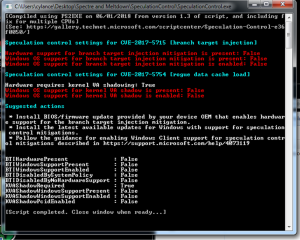
Windows 7
For Windows 7, download the appropriate version of the update for your system from Microsoft’s update catalog
Once applied and your system restarts, check your system again with the script above. When completed, you should see the following on your system that is now patched:
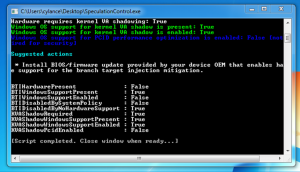 Windows 8 or 10
For Windows 10 there is an automatic update which requires you to change the registry that will allow automatic updates to show as an out of band patch.
The keys to add and remove automatic updates on Windows 8 or 10 are below:
To enable the fix *
- reg add “HKEY_LOCAL_MACHINE\SYSTEM\CurrentControlSet\Control\Session Manager\Memory Management” /v FeatureSettingsOverride /t REG_DWORD /d 0 /f
- reg add “HKEY_LOCAL_MACHINE\SYSTEM\CurrentControlSet\Control\Session Manager\Memory Management” /v FeatureSettingsOverrideMask /t REG_DWORD /d 3 /f
- Restart the computer for changes to take effect.
To disable the fix *
- reg add “HKEY_LOCAL_MACHINE\SYSTEM\CurrentControlSet\Control\Session Manager\Memory Management” /v FeatureSettingsOverride /t REG_DWORD /d 3 /f
- reg add “HKEY_LOCAL_MACHINE\SYSTEM\CurrentControlSet\Control\Session Manager\Memory Management” /v FeatureSettingsOverrideMask /t REG_DWORD /d 3 /f
- Restart the computer for changes to take effect. (There is no need to change MinVmVersionForCpuBasedMitigations.)
There’s also a script you can download from Cylance to simplify the registry edits needed. Please note that this requires you have a Cylance account for support.
Once the registry is updated and the Windows 8 or 10 computer has been rebooted, simply check for available updates. Once completed, verify using the above script to ensure the updates applied have taken effect.
You can also manually download Windows 8, 10 and server updates from Microsoft’s Update Catalog.
Finally, beware that if your AV vendor is not compatible, the registry update could bluescreen your windows pc/server.
Stay Safe! We hope this information helps our community.
###